


Data Quality
The data in LFX Insights is powered by Linux Foundation's Community Data Platform (CDP). CDP aggregates, cleans, enriches, and analyzes information across thousands of open source projects.
As anyone who's worked with open source data knows, the data can be messy. In the following we describe some of the data challenges as well as the data quality process that runs in the background.
Why Open Source Data Is Complex
Open source contributions span diverse communities, tools, and structures. There’s no single source of truth - which creates challenges in mapping and cleaning data.
Here are some examples of the challenges we face:
Contributors
- Use different email addresses and social handles across platforms
- Frequently change employers
- Add personal or hobby projects to their open-source profiles
Organizations
- Have complex corporate structures with nested subsidiaries
- Rename, merge, or restructure
- Use different domains and naming conventions across platforms
Projects
- Use different platforms & tools (GitHub, GitLab, mailing lists, etc.)
- Lack consistent governance metadata (e.g., unclear maintainer roles)
- Sometimes represent mirrors, experiments, or documentation-only repos
Our Data Quality Process
To ensure data completeness and correctness, we follow a multi-step process that combines automation, human validation, and community feedback.
Step 1: Raw Data Collection
We collect raw data from third-party sources like GitHub via our Community Data Platform. At this stage, data correctness is sometimes as low as 20% due to duplication, mismatches, or outdated information.
Step 2: Data Onboarding
We ingest data into LFX systems and structure it for analysis. This includes linking identities, mapping contributors to organizations, and parsing contribution records.
Step 3: AI-Powered Enrichment & Deduplication
Our internal AI agents clean, enrich, and deduplicate the data. At this stage, we achieve ~90% data correctness.
Step 4: Manual QA & Feedback Loops
Our data quality team manually reviews edge cases and uses:
- Random sample checks across projects
- Feedback from project maintainers & LF staff
- Self-correction mechanisms from within Insights (see "How you can help to improve data quality")
At this point, data correctness is typically above 90%, continuously improving with user feedback.
How You Can Help to Improve Data Quality
We know that the data is not perfect (and probably never will be). There are too many moving parts in open source and too many weak control data sources. We therefore rely on the community to help us correct incorrect data.
⚠️ Note
You must be signed in with your LFID account to report an issue.
Where to find "Report issue"
- Widget menu: click the three-dot menu on any insight widget. The area and data insight are pre-filled automatically.
- Project header: click the three-dot menu or the report-issue icon in the project header.
- Site footer: a "Report issue" link is always available at the bottom of the page.

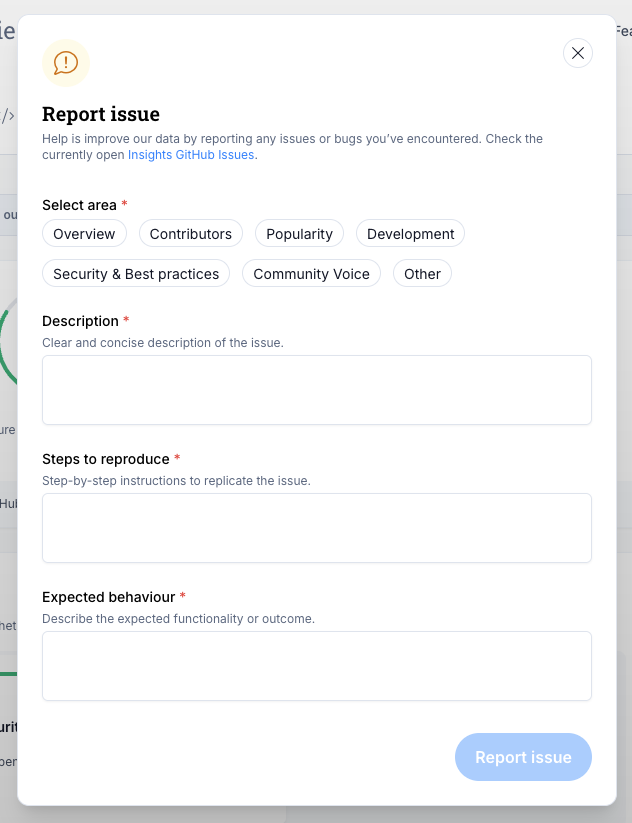
Filling out the form
The form has the following fields:
| Field | Required | Notes |
|---|---|---|
| Area | Yes | Which section of Insights the issue is in (pre-filled from widget menu; hidden for footer reports) |
| Data insight | No | The specific widget or metric (pre-filled from widget menu; hidden for footer reports) |
| Description | Yes | What you observed |
| Steps to reproduce | Yes | How to see the issue |
| Expected behaviour | Yes | What you expected to see instead |
Click "Report issue" to submit.
What happens after you submit
Your report opens a public GitHub issue on the linuxfoundation/insights repository tagged needs-triage. The success notification includes a "View issue" link so you can track its status. The LFX team is also notified internally.
You can also contact us directly at [email protected].